
마트철수
[063] MyBatis와 스프링 연동 !! 본문
2024.08.06(화)
Spring 3일차
Spring
PART01 00
- CH02. 스프링의 특징과 의존성 주입
- CH03.1 스프링 MVC의 기본 구조
- CH03.2 스프링 MVC의 Controller 1
- CH03.3 스프링 MVC의 Controller 2
- CH03.4 SpringLegacy 업데이트
- CH04.1 스프링과 MySQL Database
- CH04.2 MyBatis와 스프링 연동
CH03.3 스프링 MVC의 Controller 2
Controller의 리턴 타입
Controller 메서드의 리턴 타입
- String: 뷰의 이름
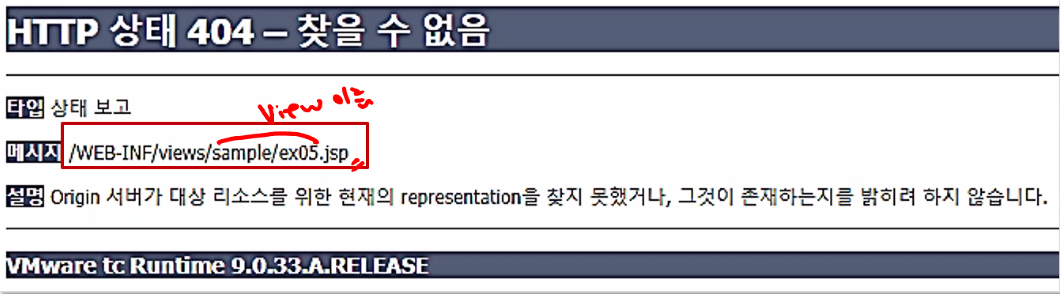
- void: 호출한 URL가 jsp 이름이 됨
- VO, DTO 타입: JSON 타입의 데이터로 변환
- ResponseEntity 타입: Http 헤더 정보와 내용을 가공
# jsp → vue 연결시 하단 2개 타입을 많이 사용하게 될 예정
# String, void => 디폴트값
# VO, DTO와 ResponseEntity => Vue 연결시 사용
- void 타입
Controller까진 해석되었으나, 해당 jsp 파일이 없음 → 404 에러(뷰이름으로 해석)
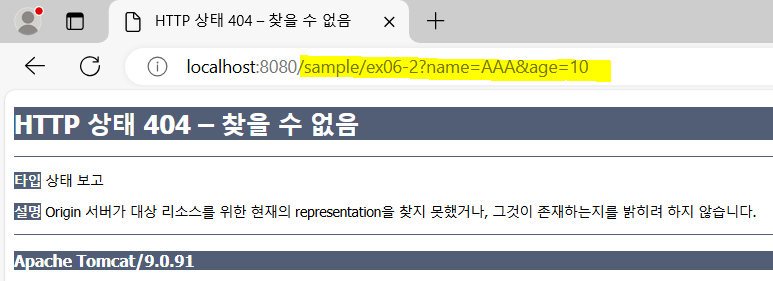
# 404 에러가 발생하는 2가지 경우: 1) 요청 경로가 잘못되었을때 2) jsp 파일이 없을 때
- RedirectAttributes
- Servlet에서 redirect 방식
response.sendRedirect("/sample/ex06?name=aaa&age=10"); - Spring MVC 방식
1) RedirectAttributes ra매개변수 지정
2) addFlashAttribute(이름, 값) 메서드로 지정
// 뷰 이름이 아닌 요청 경로를 제시
- Servlet에서 redirect 방식
- 객체 타입
: JSON 타입 응답하는 경우 사용
: jackson-databind 라이브러리 필요
# 이 실습에서 이전에 만들어둔 SampleDTO의 @ALL~ 부분 주석처리해야함
  // Jackson - Json 처리
  implementation 'com.fasterxml.jackson.core:jackson-databind:2.9.4'
- ResponseEntity 타입
브라우저로 직접 응답하는 경우 → 응답 헤더 , 응답 바디 설정 필요
# msg: 바디, header: 헤더, HttpStatus.OK: 상태코드(200)
@GetMapping("/ex08")
    public ResponseEntity<String> ex08(){
        log.info("/ex08.......");

        // {"name": "홍길동"}
        String msg = "{\"name\": \"홍길동\"}";

        HttpHeaders header = new HttpHeaders();
        header.add("Content-Type", "application/json;charset=UTF-8");

        return new ResponseEntity<>(msg, header, HttpStatus.OK);
    }
파일 업로드
- Servlet 3.0 기능 이용
- multipart 설정
- multipart encoding
- frame으로 파트를 구분한다 (frame은 임의의 문자열)
'--frame'이 파트 시작 - 데이터 1개 = part / ex) a=b & c=d → 'a=b'가 하나의 part
- frame으로 파트를 구분한다 (frame은 임의의 문자열)
Content-Type: multipart'form-data; boundary=frame

<<body>>
--frame
Content-type: image/jpeg
Content-Length: 33377
- base64 인코딩
: Binary Data를 Test로 바꾸는 Encoding(binary-to-text encoding schemes)
: base64 인코딩을 하면 크기가 원본보다 33% 커짐 (3byte → 4byte)

Controller의 Exception 처리
스프링 MVC의 예외 처리
- @ExceptionHandler와 @ControllerAdvice를 이용한 처리
- @ResponseEntity를 이용하는 예외 메시지 구성
@ControllerAdvice
- HTTP 상태코드 500 Internal Serveer error에 대응하기 위한 기법
- AOP(Aspect-Oriented-Programming)을 이용
- org.scoula.exception.CommonExceptionAdvice
CH04.1 스프링과 MySQL Datebase 연동
커넥션 풀 설정
DataSource
- Connection Pool
- 다중사용자일때? 요청이 끝나면 connection 반납 => Connection Pool
- core의 개수만큼 준비
- 요청이 오면? 안쓰는걸 배정 → 다 배정되면 반납할 때까지 대기 → 관리하는 것 = DATA SOURCE

'KB IT's Your Life > 교육' 카테고리의 다른 글
| [065] MyBatis 비즈니스 계층의 CRUD 구현 (0) | 2024.08.08 |
|---|---|
| [064] MyBatis와 스프링 연동 + CRUD 연동 (0) | 2024.08.07 |
| [062] 스프링 MVC의 Controller (1) | 2024.08.05 |
| [061] 알고리즘: 백트래킹 (1) | 2024.08.02 |
| [060] FrontController 그리고 Spring 시작 (1) | 2024.08.01 |
'KB IT's Your Life/교육' Related Articles
more


