
마트철수
[069] Rest API 본문
2024.08.19(월)
Spring 10일차
json을 이용해서 객체의 모양으로 정보를 송수신함
그러면 클라이언트의 제약이 없어짐!
Spring
PART01
- CH02. 스프링의 특징과 의존성 주입
- CH03.1 스프링 MVC의 기본 구조
- CH03.2 스프링 MVC의 Controller 1
- CH03.3 스프링 MVC의 Controller 2
- CH03.4 SpringLegacy 업데이트
- CH04.1 스프링과 MySQL Database
- CH04.2 MyBatis와 스프링 연동
- CH05.1 영속, 비즈니스 계층의 CRUD 구현
- CH05.2 비즈니스 계층
- CH05.3 프레젠테이션(웹) 계층의 CRUD 구현
- CH06.1 화면 처리
- CH06.2 File, Upload, Download
Part 4. Rest API
- CH07 Rest Controller
- CH08.1 OpenApi
- CH08.2 RestTemplate
- Spring Security
CH08.1 OpenApi
OpenApi - Openweather
Open Api 호출
https://api.openweathermap.org/data/2.5/weather?q=seoul&APPID=xxxxxxxxx&lang=kr
png 호출

https://openweathermap.org/img/w/01d.png
CH08.2 RestTemplate
# 라이브러리를 사용해서 클래스로 정의?
의존성 추가
implementation 'org.apache.httpcomponents:httpcore:4.4.15'
implementation 'org.apache.httpcomponents:httpclient:4.5.13'
RoboPOJOGenerator 설치
- 결과 json에 해당하는 걸 플러그인 해줌

POJO 생성
- Lombok, Jackson 중복 선택
- 최상위 클래스명을 지정해주어야함
- main, WeatherItem이 중요한 클래스 !!


RestTemplate 메서드
- getForObject : # 객체로 해석해달라 → GET 요청을 보내고 객체로 결과 반환
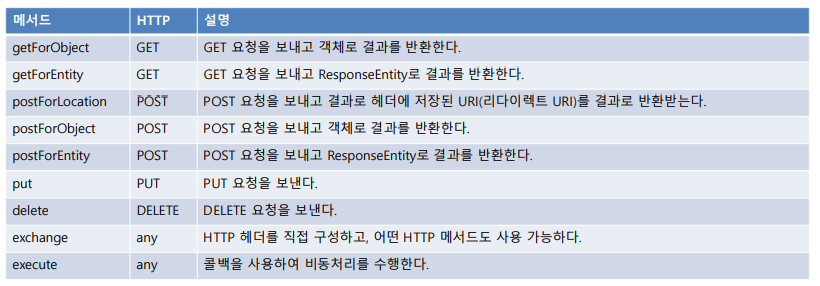
RestTemplate의 동작 원리
- HTTPClient: HTTP를 사용하여 통신하는 범용 라이브러리
- RestTemplate: HttpClient를 추상화해서 제공
WeaterController.java
- null 여부에 따라 분류
- RestTemplate 준비하고 fromHttpUrl
@GetMapping({"", "/{city}"})
public String weather(Model model, @PathVariable(value="city", required = false) String city) {
city = city == null ? "seoul" : city;
package org.scoula.weather.controller;

import org.springframework.beans.factory.annotation.Value;
import lombok.extern.slf4j.Slf4j;
import org.scoula.weather.dto.WeatherDTO;
import org.springframework.context.annotation.PropertySource;
import org.springframework.stereotype.Controller;
import org.springframework.ui.Model;
import org.springframework.web.bind.annotation.GetMapping;
import org.springframework.web.bind.annotation.PathVariable;
import org.springframework.web.bind.annotation.RequestMapping;
import org.springframework.web.client.RestTemplate;
import org.springframework.web.util.UriComponentsBuilder;

@Controller // 메소드의 반환값을 뷰로 받는다
@Slf4j
@RequestMapping("/weather")
@PropertySource({"classpath:/application.properties"}) // 어디서 리소스를 가져올지 명시
public class WeatherController {
    @Value("${weather.url}")
    private String URL;
    @Value("${weather.icon_url}")
    private String ICON_URL;
    @Value("${weather.api_key}") //application.properties에서 키값으로 설정을 가져옴
    private String API_KEY;

//    도시명을 PathVariable로 받겠다
    @GetMapping({"", "/{city}"}) // 주소 형식이 /weather, /weather/{city}로 올 경우 둘 다 처리
    public String weather(Model model, @PathVariable(value="city", required = false) String city) {
//        requires=false로 주면 해당 값이 옵션 처리된다
        city = city == null ? "seoul" : city; // city가 null이면 city는 서울. null이 아니면 넣어준 값 그대로 return 한다.

        RestTemplate restTemplate = new RestTemplate();
        String url = UriComponentsBuilder.fromHttpUrl(URL)
                .queryParam("q", city)
                .queryParam("units", "metric")
                .queryParam("APPID", API_KEY)
                .queryParam("lang", "kr")
                .toUriString(); // 기본 url에 쿼리스트링을 연결해서 새로운 주소 생성
//        생성한 url을 통해서 WeatherDTO 결과값 반환받아옴
        WeatherDTO weather = restTemplate.getForObject(url, WeatherDTO.class);

        // List<WeatherItem>에서 get(얻어와) 0번째를
        String iconUrl = ICON_URL.formatted(weather.getWeather().get(0).getIcon());
        // WeatherDTO의 weather => WeatherItem의 리스트 중 첫번째 아이템의 아이콘으로 ICON_URL 포맷
        // 제대로 받았는지 log로 확인하고
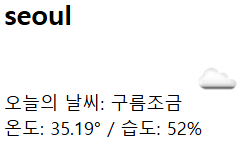
        log.info("오늘의 날씨: " + weather);

        // 도시, 날씨, 아이콘 url이 무엇인지 확인 ?
        // 뷰쪽에서 사용하기 위해 model에 데이터 저장
        model.addAttribute("city", city);
        model.addAttribute("weather", weather);
        model.addAttribute("iconUrl", iconUrl);

        // @Controller에서는 리턴값이 곧 뷰 이름
        return "weather/today";
    }
}
Spring Security
Spring Web Security 설정
- filter 기반 → 비지니스 로직에는 영향을 주지 않는다
- controller까지 오는 과정에서 보안 처리 = filter 레벨에서 처리하겠다
- # 보안은 이전에 있던 라이어브러리를 사용해라
- # 왜냐면 보안은 내(초보 개발자)가 직접 하게되면 다 뚫려버리기 때문 ..

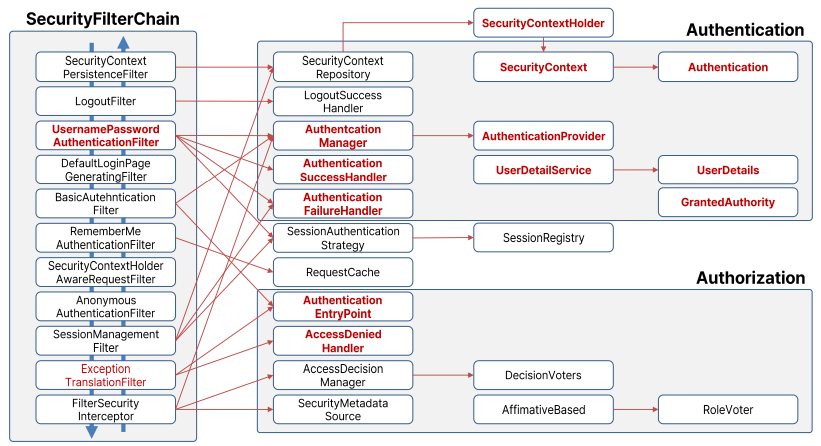
1. AuthemticiationFilter
- 분석 시작
- 로그인하면 post 요청으로 username, password가 전달됨
- User ~ Token을 만들어줌
- 어디서 username과 password를 관리해주나? 다 interface로 추상화해둠
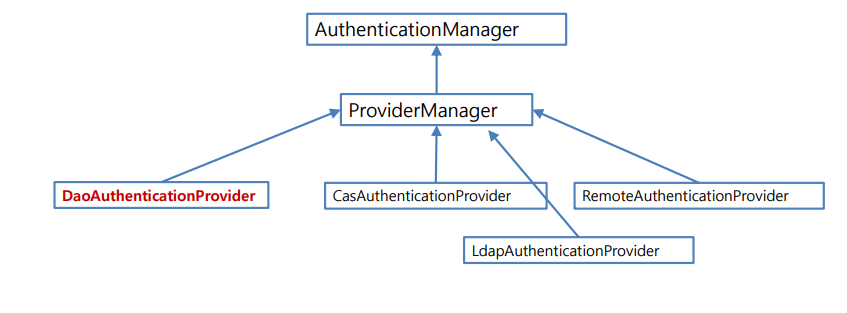
2. AuthenticationManager
- 준비되어있는 user 정보 관리자에게
- 주로 데이터베이스에 저장하지만, 메모리나 file 등에도 가능
3. AuthenticationProvider
- 이 user에 대한 password가 무엇인지 확인
4. UserDetailsService
- 실제 DB에 접근하는 서비스
5. UserDetails
- 올바른 사용자인지 판단 후 리턴
※ 정상적인 이용자라면 SecurityContextHolder에 쌓임
※ View가 이 홀더에 접근해서 사용자에 대한 정보를 얻어낼 수 있음
위 스프링 시큐리티 아키텍처 흐름을 이해해야함
UserDetailsService, UserDetails는 우리가 구현해야하는 부분
SecurityConfig.java
- 보안에서 가장 중요한 Config
package org.scoula.security.config;

import lombok.extern.log4j.Log4j;
import org.springframework.context.annotation.Configuration;
import org.springframework.security.config.annotation.web.configuration.EnableWebSecurity;
import org.springframework.security.config.annotation.web.configuration.WebSecurityConfigurerAdapter;

@Configuration
@EnableWebSecurity
@Log4j
public class SecurityConfig extends WebSecurityConfigurerAdapter {
}
인증과 권한 부여
- 인증: 자신을 증명하는 것
- 인가: 남에 의해서 자격이 부여됨
스프링 시큐리티를 커스터마이징 하는 방식
- AuthenticationProvide를 직접 구현하는 방식
- 실제 처리를 담당하는 UsrDetailsService를 구현하는 방식
AuthenticationManager(인증 매니저)
- 인증 담당
- 다양한 방식의 인증을 처리
Security Filter Chain
로그인 로그아웃
SecurityConfig.java (★)
- 문자셋 필터를 Override 앞에 위치 시켜라
- 매우 중요한 Config
package org.scoula.security.config;

import lombok.extern.log4j.Log4j;
import org.springframework.context.annotation.Configuration;
import org.springframework.security.config.annotation.web.builders.HttpSecurity;
import org.springframework.security.config.annotation.web.configuration.EnableWebSecurity;
import org.springframework.security.config.annotation.web.configuration.WebSecurityConfigurerAdapter;
import org.springframework.security.web.csrf.CsrfFilter;
import org.springframework.web.filter.CharacterEncodingFilter;

@Configuration
@EnableWebSecurity
@Log4j
public class SecurityConfig extends WebSecurityConfigurerAdapter {
    // 문자셋 필터
    public CharacterEncodingFilter encodingFilter() {
        CharacterEncodingFilter encodingFilter = new CharacterEncodingFilter();
        encodingFilter.setEncoding("UTF-8");
        encodingFilter.setForceEncoding(true);
        return encodingFilter;
    }

    @Override
    public void configure(HttpSecurity http) throws Exception {
        http.addFilterBefore(encodingFilter(), CsrfFilter.class);

    }
}
접근 제한 설정
- 경로별 인증/권한 설정
- 내부적으로 builder 패턴적용되어 있음.
- 대부분 메서드의 리턴값이 HttpSecurity임 메서드 체인닝으로 설정해 나감
http.authorizeRequests() // 모두 허용
.antMatchers("/security/all").permitAll() // 특정 역할에게만 허용 .antMatchers("/security/admin").access("hasRole('ROLE_ADMIN')") .antMatchers("/security/member").access("hasRole('ROLE_MEMBER')")
// 로그인 사용자에게 허용
.antMatchers("/board/write",
"/board/modify",
"/board/delete").authenticated();
지금까지 완료한 페이지는 아래와 같다.
실제 로그인이 되지 않은 상태이나,
서버로 연결되었다니 너무 신기하군 ..!

'KB IT's Your Life > 교육' 카테고리의 다른 글
| [071] JWT, Api Server Security (0) | 2024.08.21 |
|---|---|
| [070] Spring 로그인과 로그아웃 처리 (0) | 2024.08.20 |
| [068] REST API (2) | 2024.08.14 |
| [067] Spring 화면 처리 - BoardController (0) | 2024.08.13 |
| [066] Spring: 서버로 화면 처리 (0) | 2024.08.12 |


